• UK BOND CT Operational: 22 June 2026

  • All Stakeholders Webinar: 08 Apr 2026

  • UAT Environment available: 13 Apr 2026

  • Prod Connectivity Testing (Contributors): 27 Apr 2026

  • Prod Connectivity Onboarding (Contributors): 25 May 2026

  • Prod Onboarding (Users): 02 Jun 2026

  • Go-Live Readiness Check Webinar: 08 Jun 2026

Using the Data

User Onboarding

Production Onboarding

The production environment will be available from 22 June 2026.

It is the live environment to access and consume the UK bond Consolidated Tape. Please see the timeline for Production onboarding milestones.


UAT Onboarding

The User Acceptance Testing (UAT) environment is free to use and is available from 13 April 2026.

It is a dedicated test environment provided for Enterprise users and Redistributors to test consumption of a sample dataset via API.

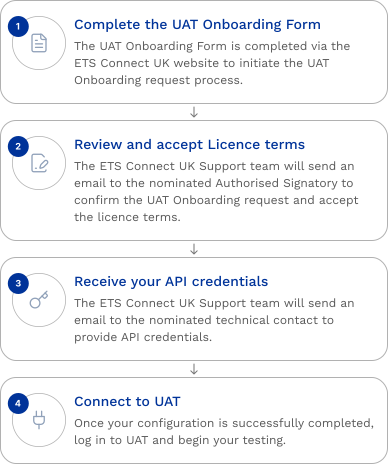
This guide outlines the steps to gain access to the ETS Connect UK UAT environment.
 

UAT Onboarding Form

Please download the guide for assistance on how to complete the online Onboarding Form below. This outlines the information needed for each section and explains what happens after you submit the Onboarding Form.

ETS Connect UK User UAT Onboarding Guide v1.0Download

Please visit the Knowledge Centre for answers to FAQs.

Section 1. Entity/User details

Name
Personal email cannot be used in this field
Please provide LEI in ISO 17442 format

Section 2. User Licence Type

Type of Licence
Choose Enterprise Licence or Redistributor Licence (or both if relevant). Revenue tier is only applicable for Enterprise Users

Section 3. Technical Contact

To receive FIX API Credentials
Name
Personal email cannot be used in this field

Section 4: Authorised Signatory

Please provide the contact information of an individual within your organisation who is authorised to accept terms. This person will be sent an email asking for confirmation of the UAT onboarding request and to accept the relevant licence terms (i.e. Enterprise or Redistributor, or both) before connectivity details are sent to the nominated technical contact.
Name
Save and Resume Later


If you have any questions, please contact our Support team: [email protected]